GitHub Workflow
This guide covers the end-to-end Git and GitHub workflow for contributing to HAMi. It applies to both the HAMi core repository and the documentation website.
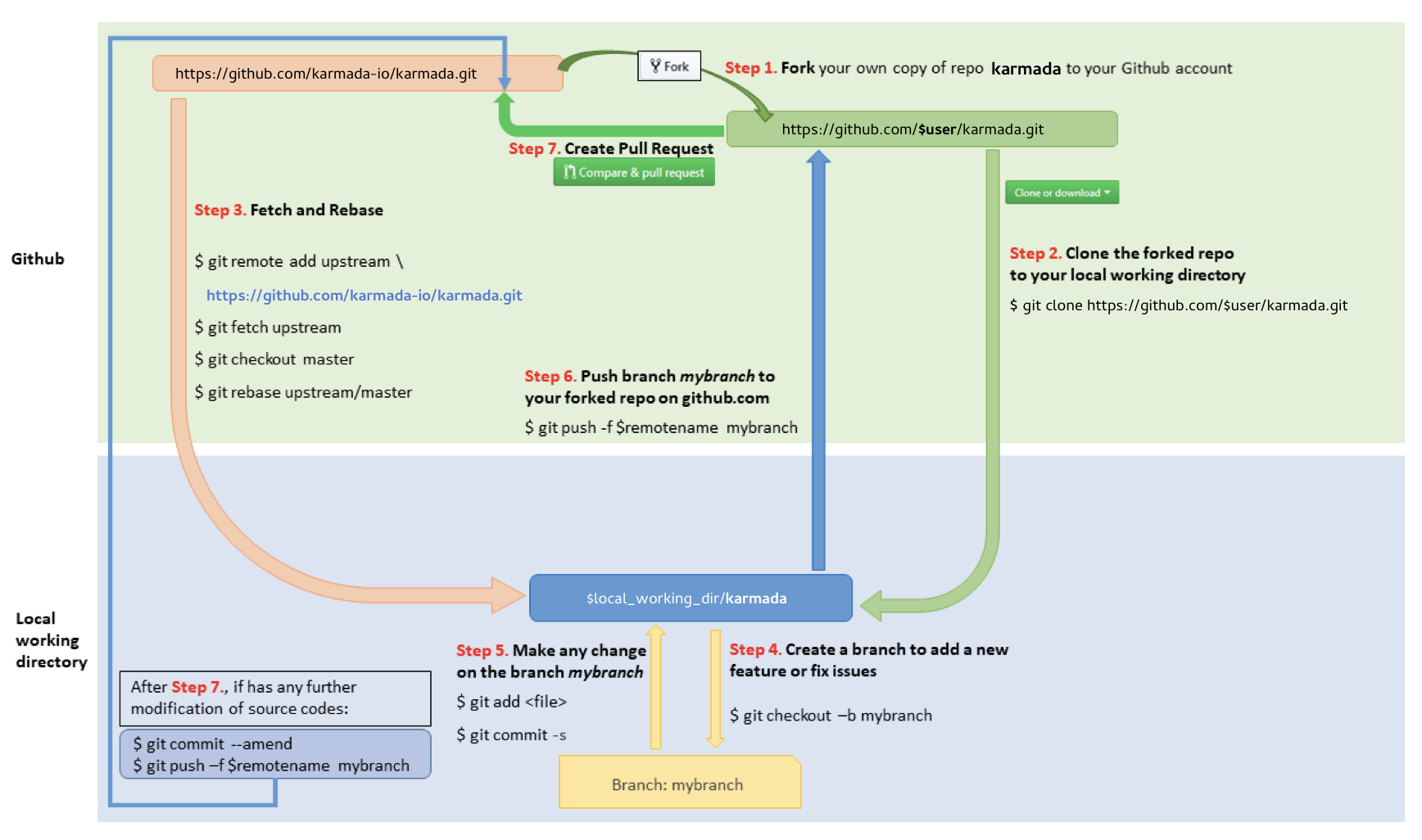
Fork and clone
Fork the target repository on GitHub, then clone your fork locally:
export user="your-github-username"

# For HAMi core
git clone https://github.com/$user/HAMi.git
cd HAMi
git remote add upstream https://github.com/Project-HAMi/HAMi.git
git remote set-url --push upstream no_push

# For the docs website
git clone https://github.com/$user/website.git
cd website
git remote add upstream https://github.com/Project-HAMi/website.git
git remote set-url --push upstream no_push
Verify your remotes:
git remote -v
Expected output:
origin    https://github.com/<your-username>/HAMi.git (fetch)
origin    https://github.com/<your-username>/HAMi.git (push)
upstream  https://github.com/Project-HAMi/HAMi.git (fetch)
upstream  no_push (push)
The no_push setting prevents accidental pushes to the upstream repository.
Keep master in sync
Before starting any new work, sync your local master with upstream:
git fetch upstream
git checkout master
git rebase upstream/master
Use rebase, not merge. Merge commits clutter the history and make it harder to cherry-pick fixes.
Create a branch
Branch off master with a short, descriptive name:
git checkout -b fix/gpu-memory-calculation
git checkout -b feat/kunlunxin-multi-card
git checkout -b docs/update-ascend-guide
Work entirely on this branch. Do not commit directly to master.
Keep your branch in sync
If upstream master has moved while you are working:
git fetch upstream
git rebase upstream/master
Resolve any conflicts, then continue:
git rebase --continue
Commit
HAMi uses Conventional Commits and requires a DCO sign-off on every commit.
git commit -s -m "fix: correct memory calculation for MLU devices"
The -s flag adds the required Signed-off-by line. Without it, CI will block the PR.
See the contributing guide for commit type conventions and message rules.
Push
Push your branch to your fork:
git push origin fix/gpu-memory-calculation
If you have rebased after a previous push, use --force-with-lease rather than --force:
git push origin fix/gpu-memory-calculation --force-with-lease
--force-with-lease refuses the push if someone else has pushed to the same branch since your last fetch, preventing accidental overwrites.
Open a pull request
- Go to your fork on GitHub:
https://github.com/<your-username>/HAMi - Click Compare & Pull Request next to your branch.
- Set the base repository to
Project-HAMi/HAMiand the base branch tomaster. - Fill in the PR description: what the change does, why it is needed, and how it was tested.
- Reference any related issue:
Fixes #123orRelates to #456.
Keep the PR focused on one logical change. See the contributing guide for guidance on PR scope.
Squash commits
Before a PR is merged, clean up the commit history. Squash fixup commits, review-feedback commits, and typo corrections into the logical commit they belong to. Each remaining commit should represent a meaningful unit of work.
To squash interactively:
# Replace 3 with the number of commits to rebase
git rebase -i HEAD~3
The editor opens with a list of commits:
pick abc1234 fix: correct memory calculation for MLU devices
pick def5678 address review feedback
pick ghi9012 fix typo
Change pick to squash (or s) for commits to fold into the one above:
pick abc1234 fix: correct memory calculation for MLU devices
squash def5678 address review feedback
squash ghi9012 fix typo
Save and close the editor. Git opens another editor to combine the commit messages - write a single clean message and save.
Force-push the result:
git push origin fix/gpu-memory-calculation --force-with-lease
Address review feedback
Push additional commits to the same branch as you address feedback. Do not close and reopen the PR.
# Make changes, then:
git add <files>
git commit -s -m "fix: address review feedback on memory limit check"
git push origin fix/gpu-memory-calculation
Squash these into the relevant commits before the PR is merged.
Revert a commit
To revert a merged commit, create a new branch off master and use git revert:
git fetch upstream
git checkout master
git rebase upstream/master
git checkout -b revert/fix-gpu-memory-calculation

# For a single commit
git revert <SHA>

# For a merge commit
git revert -m 1 <SHA>
Push the branch and open a PR as normal. Do not use the GitHub UI Revert button - it creates the branch inside the upstream repository instead of your fork.
